Tutorial 2: Kernel2D#
[1]:
import matplotlib.pyplot as plt
import torch
from spectpsftoolbox.kernel2d import NGonKernel2D, FunctionalKernel2D
device = torch.device('cuda' if torch.cuda.is_available() else 'cpu')
2D kernels work similar to 1D kernels in spectpsftoolbox. They can be expressed as
One can define an explicit functional form for \(k\), but there are also many kernels available in the library as well.
Functional#
[2]:
Nx0 = 255
dx0 = 0.05
x = y = torch.arange(-(Nx0-1)/2, (Nx0+1)/2, 1).to(device) * dx0
xv, yv = torch.meshgrid(x, y, indexing='xy')
We can create a functional form for the kernel \(k(x,y)\)
[3]:
kernel_fn = lambda xv, yv: torch.exp(-torch.abs(xv))*torch.exp(-torch.abs(yv)) * torch.sin(xv*3)**2 * torch.cos(yv*3)**2
[4]:
# Plot a test
kernel = kernel_fn(xv, yv)
plt.imshow(kernel.cpu().numpy(), cmap='magma')
plt.axis('off')
plt.show()
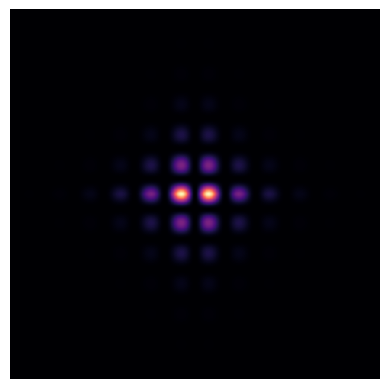
Now we can define the amplitude and scaling like we did in the 1D tutorial
[5]:
amplitude_fn = lambda a, bs: bs[0]*torch.exp(-bs[1]*a)
sigma_fn = lambda a, bs: bs[0]*(a+0.1)
amplitude_params = torch.tensor([2,0.1], device=device, dtype=torch.float32)
sigma_params = torch.tensor([0.3], device=device, dtype=torch.float32)
# Define the kernel
kernel2D = FunctionalKernel2D(kernel_fn, amplitude_fn, sigma_fn, amplitude_params, sigma_params)
/data/anaconda/envs/pytomo_install_test/lib/python3.11/site-packages/torch/functional.py:504: UserWarning: torch.meshgrid: in an upcoming release, it will be required to pass the indexing argument. (Triggered internally at ../aten/src/ATen/native/TensorShape.cpp:3526.)
  return _VF.meshgrid(tensors, **kwargs)  # type: ignore[attr-defined]
/data/anaconda/envs/pytomo_install_test/lib/python3.11/site-packages/torchquad/integration/utils.py:255: UserWarning: DEPRECATION WARNING: In future versions of torchquad, an array-like object will be returned.
  warnings.warn(
Let’s evaluate the kernel at some distances:
[6]:
a = torch.linspace(1,10,5).to(device)
kernel = kernel2D(xv, yv, a, normalize=True)
And we can plot and ensure they are normalized since we used normalize=True:
[7]:
fig, ax = plt.subplots(1, 5, figsize=(8,2))
print(kernel.sum(dim=(1,2)))
for i in range(5):
    ax[i].imshow(kernel[i].cpu().numpy(), cmap='magma')
    ax[i].axis('off')
tensor([1.0073, 1.0005, 0.9592, 0.8743, 0.7737], device='cuda:0')

Other Kernels#
There are other 2D kernels availalble.
N-gon Kernel#
The kernel below represents the point spread function expected when SPECT data is acquired using a hexagonal collimator. It can be shown that the PSF is given by
where \(\beta\) is a 2D mask that represents the shape of the bore (i.e. a hexagon for a hexagonal collimator), \(\otimes\) is the convolution operator, and \(L_b\) is the length of the collimator holes. The NGonKernel2D class can be used to model \(\beta \otimes \beta\).
[8]:
collimator_length = 2.405
collimator_width = 0.254 #flat side to flat side
sigma_fn = lambda a, bs: (bs[0]+a) / bs[0]
sigma_params = torch.tensor([collimator_length], requires_grad=True, dtype=torch.float32, device=device)
# Set amplitude to 1
amplitude_fn = lambda a, bs: torch.ones_like(a)
amplitude_params = torch.tensor([1.], requires_grad=True, dtype=torch.float32, device=device)

ngon_kernel = NGonKernel2D(
    N_sides = 6, # sides of polygon
    Nx = 255, # resolution of polygon
    collimator_width=collimator_width, # width of polygon
    amplitude_fn=amplitude_fn,
    sigma_fn=sigma_fn,
    amplitude_params=amplitude_params,
    sigma_params=sigma_params,
    rot=90
)
Let’s look at this kernel
[9]:
Nx0 = 255
dx0 = 0.048
x = y = torch.arange(-(Nx0-1)/2, (Nx0+1)/2, 1).to(device) * dx0
xv, yv = torch.meshgrid(x, y, indexing='xy')
distances = torch.tensor([1,5,10,15,20,25], dtype=torch.float32, device=device)
kernel = ngon_kernel(xv, yv, distances, normalize=True).cpu().detach()
[10]:
fig, ax = plt.subplots(1, 6, figsize=(15,3))
print(kernel.sum(dim=(1,2)))
for i in range(6):
    ax[i].set_title(f'Distance: {distances[i]}cm')
    ax[i].imshow(kernel[i], cmap='magma')
    ax[i].axis('off')
tensor([1.0000, 1.0000, 1.0000, 1.0000, 1.0000, 1.0000])
